Image

Topic titles can be added via Department Center for Independent Study and Internship classes that do not already have a topic title assigned. If a topic title is assigned and needs to be changed, do so via CLSS or by emailing class-scheduling@duke.edu.
Topic titles appear on the schedule and the transcripts of all enrolled students. Please check all entries for errors and typos.
Click the Class Options glasses icon of the appropriate class section.
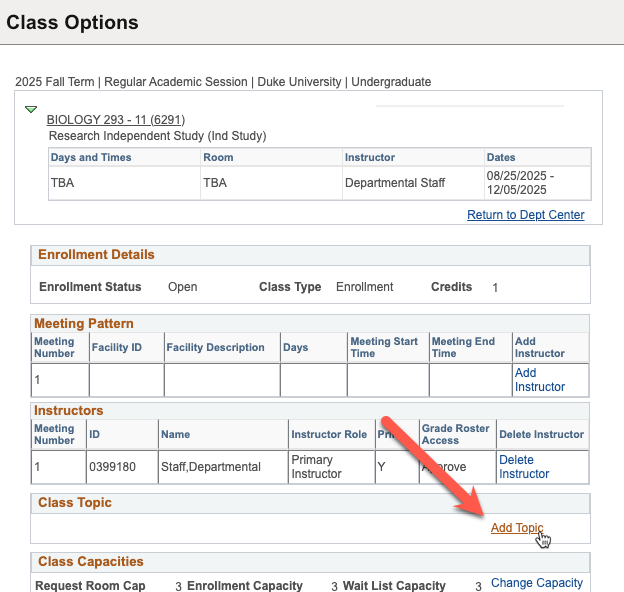
Click Add Topic in the Class Topic box.
Check the list of available topics. If the topic title already exists, click it and then select Save Selected Topic.
If the topic title does not exist, click Create New Course Topic.

Enter the topic title in the first Description field in ALL CAPS (30 characters max). Review for errors and typos. Press the Tab key to autofill the next two fields. Do not edit the second or third fields. Click Save.

Find the new topic title in the list of available topics, click it and then select Save Selected Topic.

You will see the topic title appear in the Class Topic box and in the Class Title column in the grid view of Department Center.


If you do not see the topic title appear, email class-scheduling@duke.edu. This is due to effective dating in course catalog, and the Registrar's Office can fix this for you.